Scrolling text on an 8x8 LEDS display
published: 22 June 2019 / updated 30 June 2019

Characters definition
We mean by character, any binary set written in an 8x8 square. This 8x8 dimension is the one we have in the 8x8 LED matrix display.
The orientation imposed on our 8x8 LED array is with the input connectors facing down:
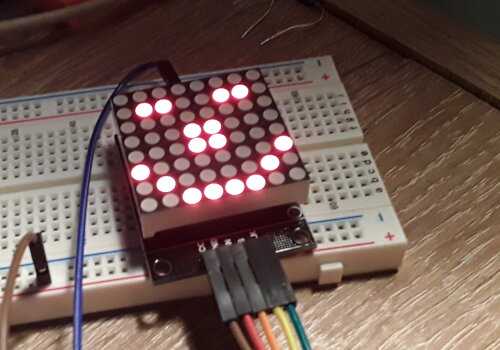
This orientation makes it possible to connect other 8x8 LED arrays by placing them on the right or on the left, allowing thus manage a display of nx8x8 LEDs. With 4 8x8 LED dies, you can display a text or drawing on a super matrix of 32x8 LEDs. Orifices are provided on the printed circuit, orifices allowing the fixing matrix displays on a stable and visible support. The ARDUINO card must stay as close to matrix displays with LEDs.
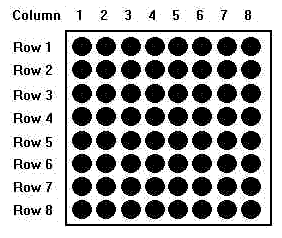
Each column corresponds to an address, numbered from 1 to 8. Sending a value between 0 and 255
in a column, ie at an address, will display this value in binary form. In the case of the smiley,
the first value will be %00100000, which is 32 in decimal, $20 in hexadecimal. The fact
Entering the values in binary allows you to have an immediate overview of the pattern to display.
SMILEY character definition
In our previous article (The SPI interface: management of an 8x8 LEDS display)
we were displaying a smiley character with the word disp-test-3, a word we rewritten by straightening
the smiley in the word disp-test-4. But the definition of the word disp-test-4 is not
satisfactory, because it would be necessary to write a word by character to display.
We will isolate the binary code to display the smiley in a table:
\ Mikael Nordman write:
\ Since you have been using flash create there is no need for ic,
\ c, will store to flash anyway.
flash
create SMILEY ( --- addr)
    %00100000 c,
    %01000010 c,
    %10000010 c,
    %10011000 c,
    %10011000 c,
    %10000010 c,
    %01000010 c,
    %00100000 c,
The word SMILEY stacks the address of the first byte compiled here%00100000 c,:
SMILEY c@ \ empile %00100000 soit 32 en décimal, $20 en hexadécimal
To access the other bytes, simply increment the address stacked by SMILEY:
SMILEY 1 + c@   \ empile %01000010
SMILEY 2 + c@   \ empile %10000010
SMILEY 3 + c@   \ empile %10011000
\ ...etc...
To extract all the bytes defined in SMILEY, it suffices to
to make an iterative loop defined:
: disp.char ( addr ---)
    1-                  \ decrement array address
    8 for
        1+ dup c@       \ increment address, duplicate and get value
        8 r@ -          \ get loop index, numbering 1 to 8
        swap max7219.send
    next
    drop                \ drop array address
    ;
The word disp.char needs the start address of the array containing the
bytes defining a drawing or character to display:
SMILEY disp.char
WARNING This may not work if the SPI interface is not initialized. This is what we will do with this word:
: smiley-disp ( ---)
    spi.init
    disp.normal
    $01 disp.intensity
    $07 disp.scan.limit
    SMILEY disp.char
    begin key? until
    disp.shutdown
    spi.close
;
Now you can run smiley-disp, which will show the smiley
on the 8x8 LED display.
Scrolling smiley display
flash
create SMILEYsprite ( --- addr)
    %00000000 c,
    %00000000 c,
    %00000000 c,
    %00000000 c,
    %00000000 c,
    %00000000 c,
    %00000000 c,
    %00000000 c,
    %00100000 c,
    %01000010 c,
    %10000010 c,
    %10011000 c,
    %10011000 c,
    %10000010 c,
    %01000010 c,
    %00100000 c,
    %00000000 c,
    %00000000 c,
    %00000000 c,
    %00000000 c,
    %00000000 c,
    %00000000 c,
    %00000000 c,
    %00000000 c,

: sprite-scroll ( addr ---)
    1-                  \ decrement array address
    16 for
        1+ dup          \ increment address, duplicate and get value
        disp.char
        200 ms
    next
    drop                \ drop array address
;

: disp-scroll ( ---)
    spi.init
    disp.normal
    $01 disp.intensity
    $07 disp.scan.limit
    begin
        SMILEYsprite sprite-scroll
    key? until
    disp.shutdown
    spi.close
;
Definition of alphanumeric characters
We defined a smiley character through the SMILEY table. Now,
we will create a table that will contain all alphanumeric characters. Let's start with
see how to encode the character "0" (zero):
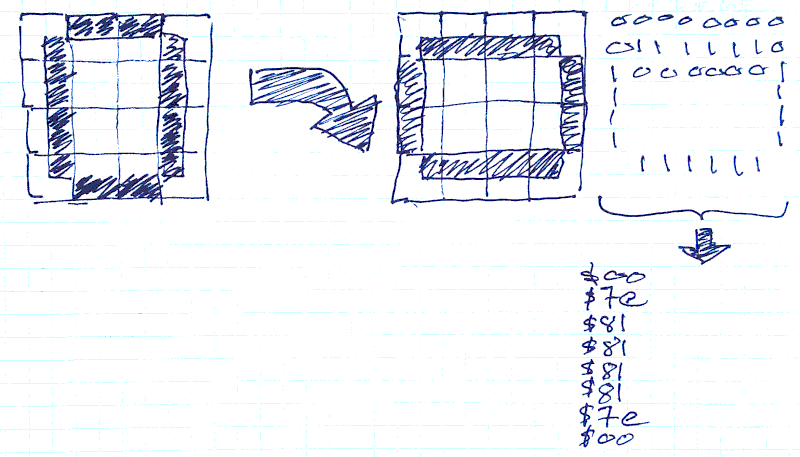
- we draw the character '0' in a square of 8x8 squares
- you turn the character clockwise 90 °
- we encode in binary or hexadecimal each line of the 8x8 square
What gives in FORTH:
\ caracters 0..9A..Z in array
flash
create CHARACTERS
    $00 c, $00 c, $00 c, $00 c,
    $00 c, $00 c, $00 c, $00 c,     \  U+0020 (space)
    $00 c, $00 c, $00 c, $00 c,
    $bf c, $00 c, $00 c, $00 c,     \  U+0021 (!1 tst)
    $00 c, $00 c, $03 c, $00 c,
    $03 c, $00 c, $00 c, $00 c,     \  U+0022 (")
    $00 c, $24 c, $ff c, $24 c,
    $24 c, $ff c, $24 c, $00 c,     \  U+0023 (#)
        \ <CUT> ......
    $89 c, $85 c, $7e c, $00 c,     \  U+0030 (0) (16)
    $00 c, $00 c, $00 c, $04 c,
    $82 c, $ff c, $80 c, $00 c,     \  U+0031 (1)
    $00 c, $e2 c, $91 c, $91 c,
    $91 c, $91 c, $8e c, $00 c,     \  U+0032 (2)
    $00 c, $42 c, $81 c, $89 c,
    $89 c, $89 c, $76 c, $00 c,     \  U+0033 (3)
    $00 c, $0f c, $08 c, $08 c,
    $08 c, $08 c, $ff c, $00 c,     \  U+0034 (4)
        \ <CUT> ......
    $11 c, $11 c, $fe c, $00 c,     \  U+0041 (A)
    $00 c, $ff c, $89 c, $89 c,
    $89 c, $89 c, $76 c, $00 c,     \  U+0042 (B)
    $00 c, $7e c, $81 c, $81 c,
    $81 c, $81 c, $42 c, $00 c,     \  U+0043 (C)
    $00 c, $ff c, $81 c, $81 c,
    $81 c, $81 c, $7e c, $00 c,     \  U+0044 (D)
    $00 c, $ff c, $89 c, $89 c,
    $89 c, $89 c, $81 c, $00 c,     \  U+0045 (E)
    $00 c, $ff c, $09 c, $09 c,
        \ <CUT> ......
In this table, we have compiled the matrix representation of the characters ASCII between space and Z. We will create a word to test the character display of this table on the 8x8 LED display:
: getChar ( n ---)          \ get nth caracters from CHARACTERS table
    8 * CHARACTERS + ;

: Cdisp ( n ---)            \ display character on 8x8 LED matrix
    spi.init
    disp.normal
    $01 disp.intensity
    $07 disp.scan.limit
    getChar disp.char
    begin key? until
    disp.shutdown
    spi.close  ;

: Cled ( char ---)          \ typical use: char B Cled
    32 - Cdisp ;
This is the word Cled that interests us:/p>
char ! Cled  \ display '!' on 8x8 LED matrix
char A Cled  \ display 'A'
char Z Cled  \ display 'Z'
Scroll a text
We will now exploit our character matrix table to handle scrolling text on the 8x8 LED display. Of course, it would have been much better to have several matrices LED 8x8, but as I have only one display, we will do with what we have.
The first thing to do is to create a scrollBuffer buffer that will host
the text in its matrix form:
ram create scrollBuffer
   18 8 * allot
This array scrollBuffer can accommodate a text of 18 characters, in
reality 16 characters at the most, because it will be necessary to foresee the space character at the beginning and the end
text.
Here is how to store each character in this buffer scrollBuffer:
variable inCharBuffer   \ pointer nth char

: charToBuffer ( char ---) \ copy a matric char in buffer
    32 - getChar        \ calculate start address
    scrollBuffer inCharBuffer @ 8 * + \ calculate destination address
    8 cmove             \ copy char matric
    1 inCharBuffer +!   \ increment buffer storage pointer
    ;
The word charToBuffer retrieves the ASCII code of the character to insert
in the scrollBuffer array. He's going to get the matrix table
8x8 of the character to be copied and inserts it at position n * 8, where n is the value of the index
insert inCharBuffer.
Now let's see how to handle an entire text:
: text-in-buffer ( adr len ---)
    0 inCharBuffer !    \ initialise buffer storage pointer
    32 charToBuffer     \ copy 'space' matrix in buffer
    dup                 \ duplicate len
    for
        2dup            \ duplicate adr len
        r@ 1+ - +       \ calculate adr char by char
        c@              \ get char in input string (adr len)
        charToBuffer    \ copy matric char in buffer
    next
    2drop
    32 charToBuffer     \ copy 'space' matrix in buffer
    ;
The word text-in-buffer initializes the insertion index.
Then he inserts a space character.
Then the for..next loop processes the contents of a past string
as a parameter to text-in-buffer to process this string character by character.
At the end of the loop, insert a space character again.
We will now manage the display of the content of the buffer scrollBuffer
to the 8x8 LED matrix:
: text-scroll ( ---)
    scrollBuffer 1-     \ decrement scroll buffer address
    inCharBuffer @ 1- 8 * for
        1+ dup          \ increment address, duplicate and get value
        disp.char
        200 ms
    next
    drop                \ drop array address
;
This word text-scroll once only closes the display of the content of
scrollBuffer.
Here's how to display FORTH in scrolling text on the 8x8 LED array:
: sFORTH ( --- adr len)
    s" FORTH" ;

: txt.scroll ( adr len ---)  \ example sFORTH txt-scroll
    text-in-buffer
    spi.init
    disp.normal
    $01 disp.intensity
    $07 disp.scan.limit
    begin
        text-scroll
    key? until
    disp.shutdown
    spi.close
;
The word sFORTH (for string FORTH) serves as the constant
of text. Its execution stacks the address and the length of the text "FORTH" to display:
sFORTH txt.scroll
Result in video: